How it works
Start from what you already own, or the list you already keep.
- Build your portfolio. Start from your company or corporate group and get every building it owns in one step, or upload a spreadsheet (CSV) or pasted rows, up to 1,000 properties per portfolio, each with your own reference.
- Confirm the few we're unsure of. Rows are matched by title number, UARN, UPRN or address and postcode. Anything without a confident match waits for you, with a short list of likely buildings to pick from.
- Get the Monday email. Each week, what changed across the estate, under your own references, with a link to the full record. No email at all if nothing did.
What we watch across your estate
Every building and occupier is checked against the public registers each week.
Occupiers moving in or out
Changes on the council's business-rates list for each unit: a new ratepayer, one that's left, or a unit shown as empty, where the council publishes its list.
Occupiers in trouble
Occupiers in administration, liquidation or receivership, with overdue accounts or confirmation statements, or facing strike-off at Companies House.
A rates check on every unit
Each unit's VOA price per m² against similar properties valued under the same scheme, with the units priced higher than most flagged.
EPCs expiring or below E
Units rated F or G, below the E minimum for letting non-domestic property, and certificates that have expired or are about to.
New charges on your titles
Charges registered at Companies House that name a title in the portfolio, and charges satisfied.
Planning at your buildings
New planning applications matched to each building, and decisions on them, from local planning authorities' records.
Your occupiers and your rates
Who pays the rates across your estate, and who is in trouble
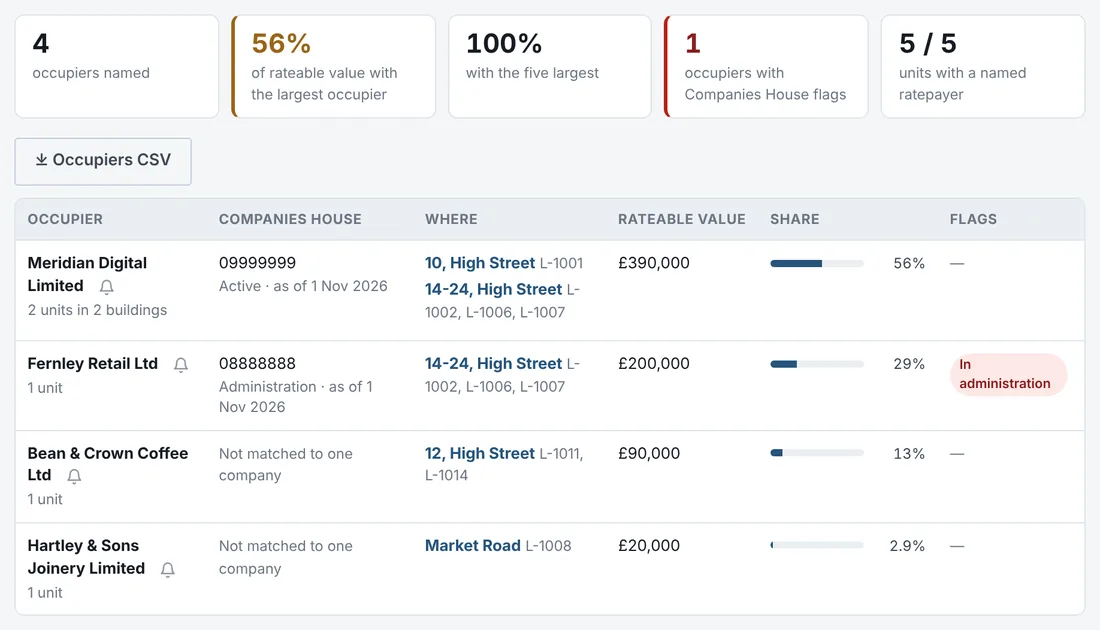
Every occupier on the council's business-rates list for your buildings, ranked by the rateable value they pay rates on, with their Companies House status.
- Concentration at a glance: your largest occupier's share, and the top five
- Occupiers in administration, with overdue accounts or facing strike-off
- A bell on each to follow it across the country, and a spreadsheet of the lot
The rates check on any unit
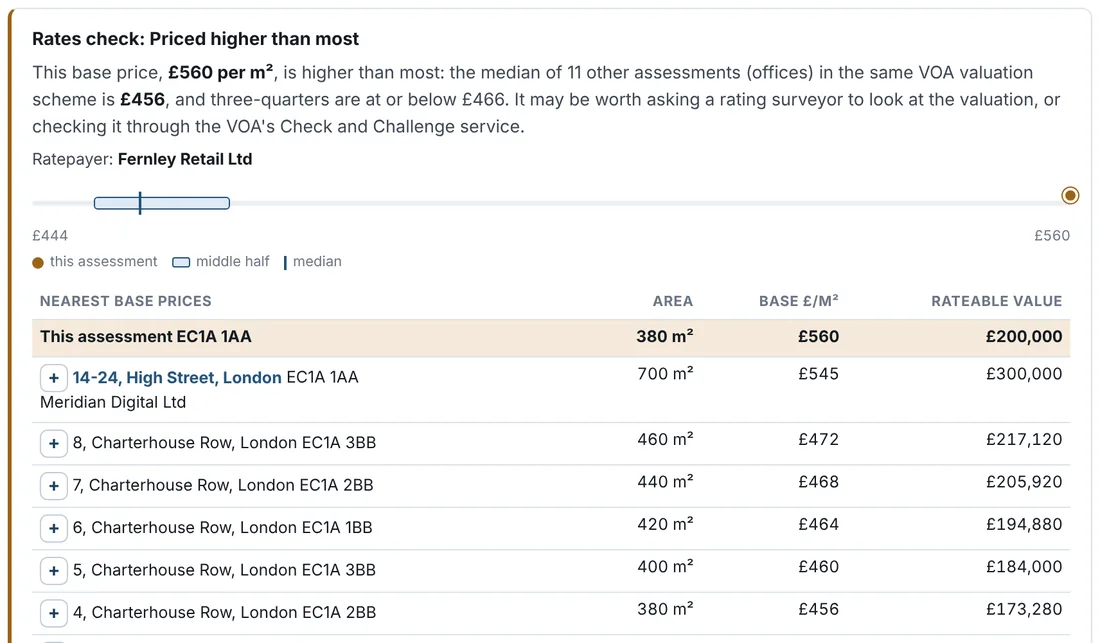
Open any assessment's VOA summary valuation and see straight away whether its price per m² is in line with the rest of its valuation scheme, with the nearest prices listed and each one a click from your comparables.
- Where the unit sits: the range, the middle half and the median
- In plain words, with the caveats a rating professional would add
Think a rateable value is too high? See the tools to challenge a valuation.
Questions owners ask
What does it cost?
Portfolios, the Monday email and due-diligence packs are free with a verified account: up to 10 portfolios of 1,000 properties each, and 25 packs a day.
How is a portfolio built from my corporate group?
Each owning company is linked to the company that controls it, and on up to the parent at the top, using the register of people with significant control that UK companies file at Companies House. Choose your company or group and every building with a title registered to any of its companies is added.
How are occupiers matched to Companies House?
By name, from the council's business-rates list. An occupier is linked to a company only when exactly one live company has that name, so a name shared by several companies is left unmatched rather than risk the wrong one. Individuals are never named.
What does the rates check show?
The VOA works out most business rateable values from a price per square metre for the main space (Zone A for shops), set for groups of similar properties it values together under one valuation scheme. The rates check sets a unit's price against the others in its scheme and shows where it sits, with the nearest prices listed. A unit priced higher than most may be worth a closer look by a rating surveyor or through the VOA's Check and Challenge service. It's a guide, not rental evidence: properties are priced differently for real reasons such as position, size and condition.
Why isn't the ratepayer shown for every unit?
Because each council decides whether to publish who pays its business rates. A ratepayer is missing when the council doesn't publish it, when its file can't be tied reliably to the rating list, when the ratepayer is an individual or sole trader (councils withhold their names), or when the account changed after the council's last file. More councils are added as their data is checked and matched.
Is my portfolio private?
Your portfolios and lists are visible only to your account. They aren't shared, published or used to change what other users see. You can delete them at any time.
Put your estate on watch
Start from your company or group, or upload the list you already keep. It's free.
Start a portfolio →Not an owner? See the tools for lenders, agents, surveyors, due diligence and planning.