How it works
One search across councils, then let the new ones come to you.
- Search every council at once. By address, street or postcode, a reference or a keyword in the proposal, or an agent or applicant. Filter by application type, status, when it was received, council or postcode, or draw the area on the map.
- Open the application. Its progress from received to decision, the consultation deadline, a link to the documents on the council's site, the building it's for on the register, and what else is going on at the building and nearby.
- Get alerts, or track one. Save the search and every Monday you get the new applications that match and the decisions on the ones it found. Or track a single application and hear when its status changes or it's decided.
Every council's applications in one search
Search applications on a map, across councils
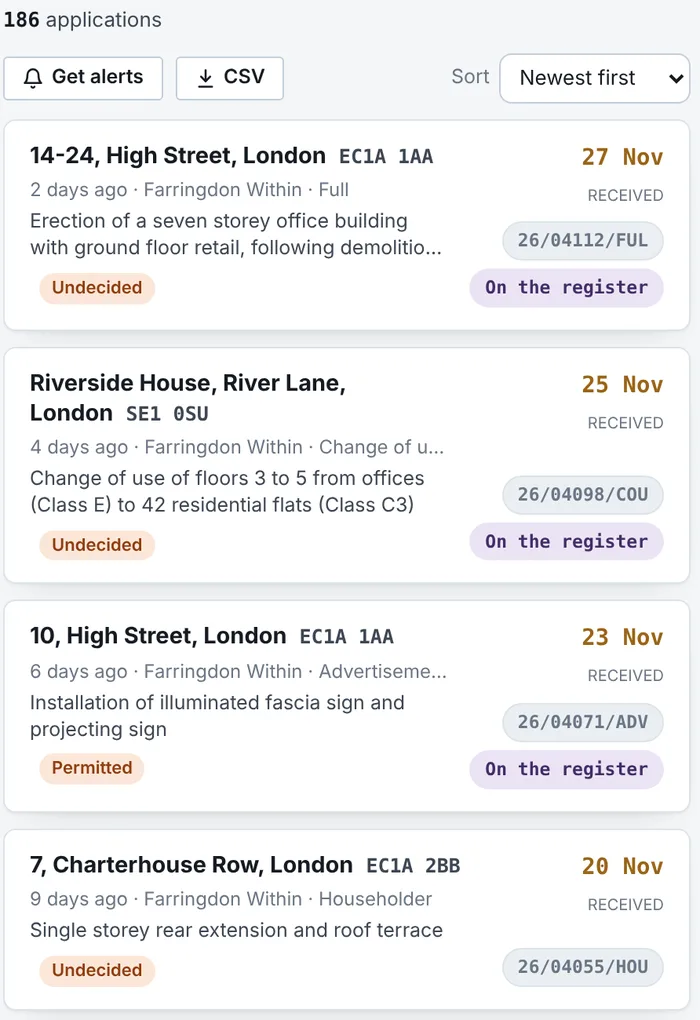
Applications from local planning authorities' registers, on the same map-and-list layout as the property search. Pan the map and the list follows, or draw a boundary around a site.
- Filters for application type, status, received in the last 2 weeks, month, 3 months or year, council, postcode, and applications matched to a building on the register
- Pins coloured by how recently each application was received
- Sort by newest, oldest or decision date
- Get alerts on any search, and a CSV of the results for your own records
Each application, with the building behind it
The application, the building and what's around it
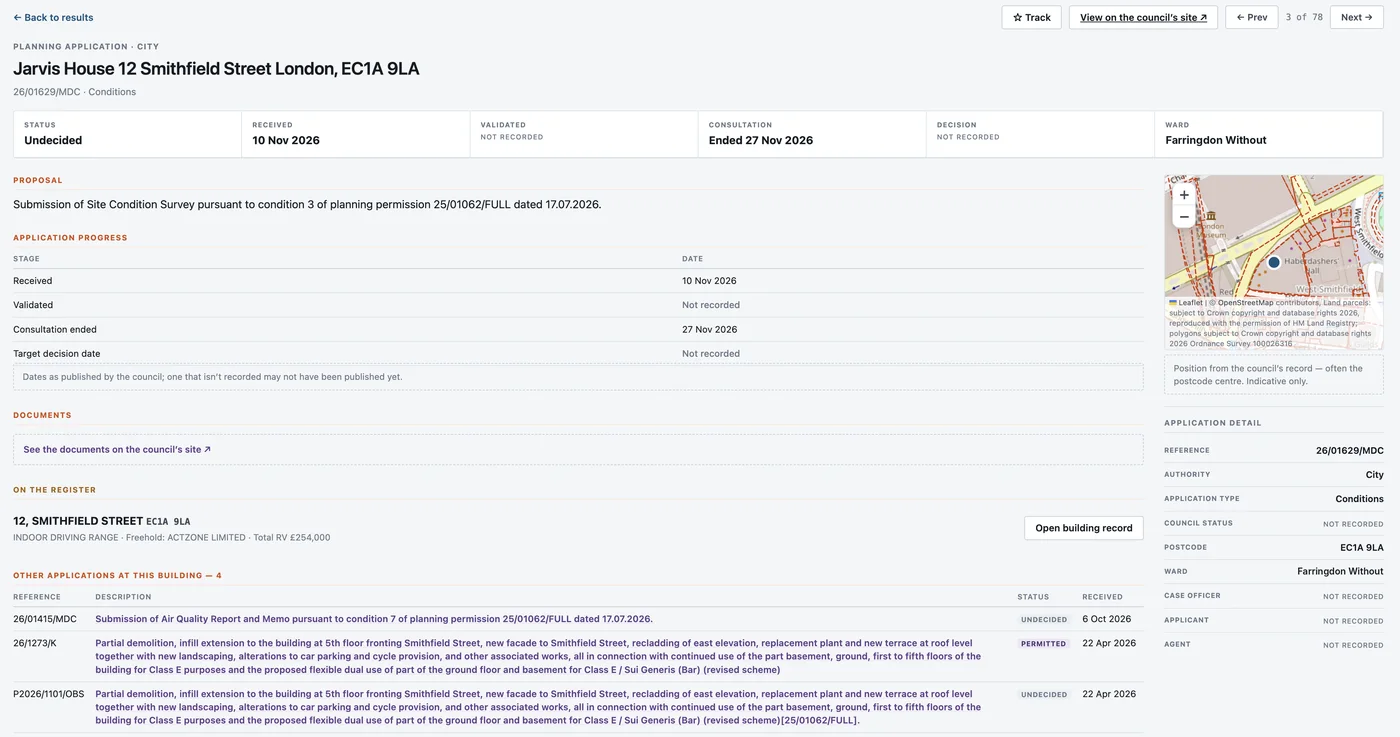
Every application has its own page laid out like a building record, so the planning history sits next to everything else known about the site.
- Status, received, validated, consultation open until, and the decision or its target date
- On the register: the building it's for, its use, freehold owner and rateable value, a click from the full record with charges, occupiers and energy certificates
- Other applications at the same building, and new ones within about 300 m in the last three months
- The number of documents, and a link to them on the council's site
New applications and decisions, every Monday
One email a week, for every search you care about
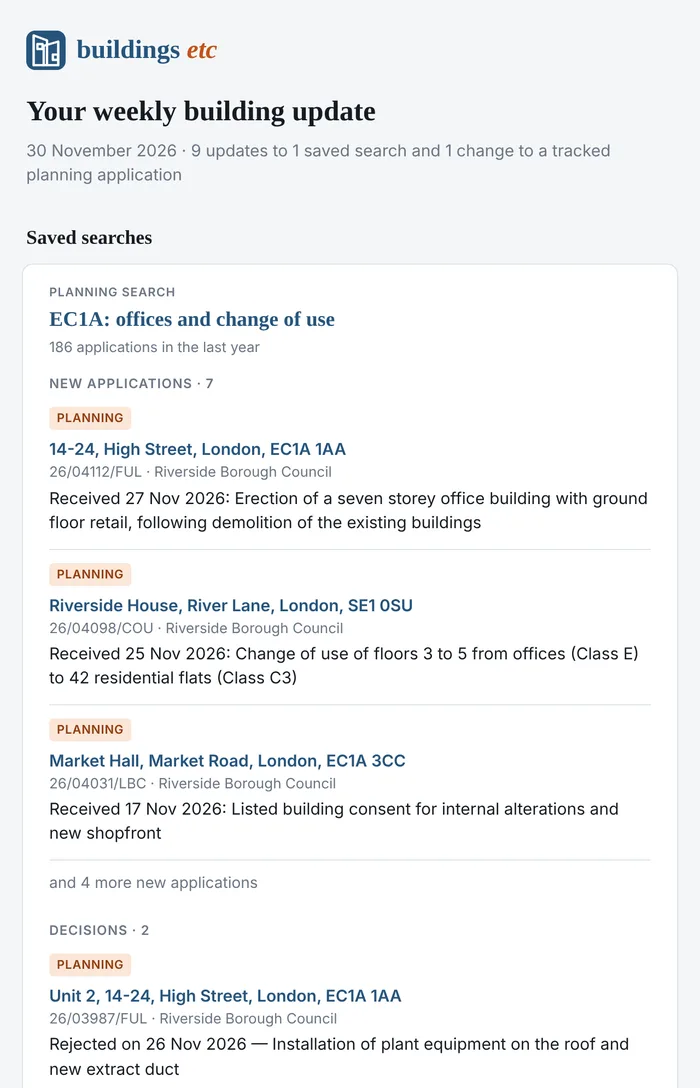
Save any planning search, an area, a council, a postcode or a keyword, and the Monday email lists what's new. Applications you track get their own section.
- New applications that match each saved search, with the proposal and the date received
- Decisions on the applications the search found: permitted, refused, withdrawn
- Tracked applications: a line when the status changes or the decision is made
- In the same email as your other alerts, and none at all in a week with nothing new
Who uses it
Planning consultants and architects
The history of a site and the applications around it before you advise, and an alert for your patch so you see new schemes and decisions without checking each council's portal.
Developers and site finders
Find sites with something going on, then see who owns them: the freehold owner, the group behind it and the charges on the title, from the building record.
Agents and property managers
Know when a building you manage, let or are marketing has an application in, or one goes in next door, and when it's decided.
Residents and neighbours
Track the applications that affect you, see when consultation closes, and hear the decision, without signing up to every council's alerts.
Questions about planning
What does it cost?
Searching is free, with no account needed. Alerts, tracked applications and spreadsheet downloads are free with a verified account: up to 25 saved searches, 200 tracked applications, and downloads of up to 500 rows a file and 5,000 a day.
Where does the planning data come from?
From local planning authorities' own registers, gathered by PlanIt. It is updated every night, and the last four months are fetched again each week to pick up decisions and changes.
How do alerts decide what's new?
Each Monday a saved search is run again. Applications that match it now but didn't last week, and that were received in the last three months, are listed as new; applications it found before that have since been decided are listed as decisions. Older applications that a council publishes late aren't sent as new.
Can I see who owns the site?
Where the application is matched to a building on the register, by address and postcode, its page shows the building with its freehold owner, and the full building record adds the corporate group, charges on the title, occupiers and energy certificates. Ownership comes from HM Land Registry's data on company-owned titles, so sites owned by private individuals show no owner.
Why can't I see the applicant or agent?
Applicant, agent and case officer names are shown only to signed-in users on the application page. They are never included in downloads or emails.
Is the location exact?
The position is the one on the council's record, which is often the centre of the postcode rather than the site itself, so treat the map as indicative.
Watch the applications that matter to you
Search an area, then turn on alerts. It's free.
Search planning applications →Not in planning? See the tools for lenders, owners, agents, surveyors and due diligence.